A quick tutorial for people who want to run goose but want it to keep your data confidential you generally have two options. First its to buy a good gpu to run a model locally, the second one is use advancement in trusted execution environments and use confidential AI backend with it.
How to do it
Go to PrivateMode and create an account and an API key.
Then, set the environment variable PRIVATE_MODE_API_KEY to your API key.
You can do this in your terminal with the following command:
export PRIVATE_MODE_API_KEY=your_api_key_here
You can also set this variable in your .env file if you are using one.
Example .env file
PRIVATE_MODE_API_KEY=your_api_key_here
Run the application
To run the application, you can use the following command:
git clone https://github.com/aljazceru/goose-confidential.git
cd goose-confidential
# If you have not installed Docker, please do so first.
# You can find instructions on how to install Docker at https://docs.docker.com/get-docker/
docker compose up -d
Or you can just create a docker-compose.yml file:
services:
  privatemode-proxy:
    image: ghcr.io/edgelesssys/privatemode/privatemode-proxy:latest
    environment:
      - PRIVATEMODE_API_KEY=${PRIVATEMODE_API_KEY:-}
      - PRIVATEMODE_CACHE_MODE=${PRIVATEMODE_CACHE_MODE:-none}
      - PRIVATEMODE_CACHE_SALT=${PRIVATEMODE_CACHE_SALT:-}
    entrypoint: ["/bin/privatemode-proxy"]
    command: [
      "--apiKey=${PRIVATEMODE_API_KEY}",
      "--port=8080"
    ]
    ports:
      - "28082:8080"
    restart: unless-stopped
For detailed instructions and documentation about privatemode-proxy, please refer to the privatemode-proxy documentation
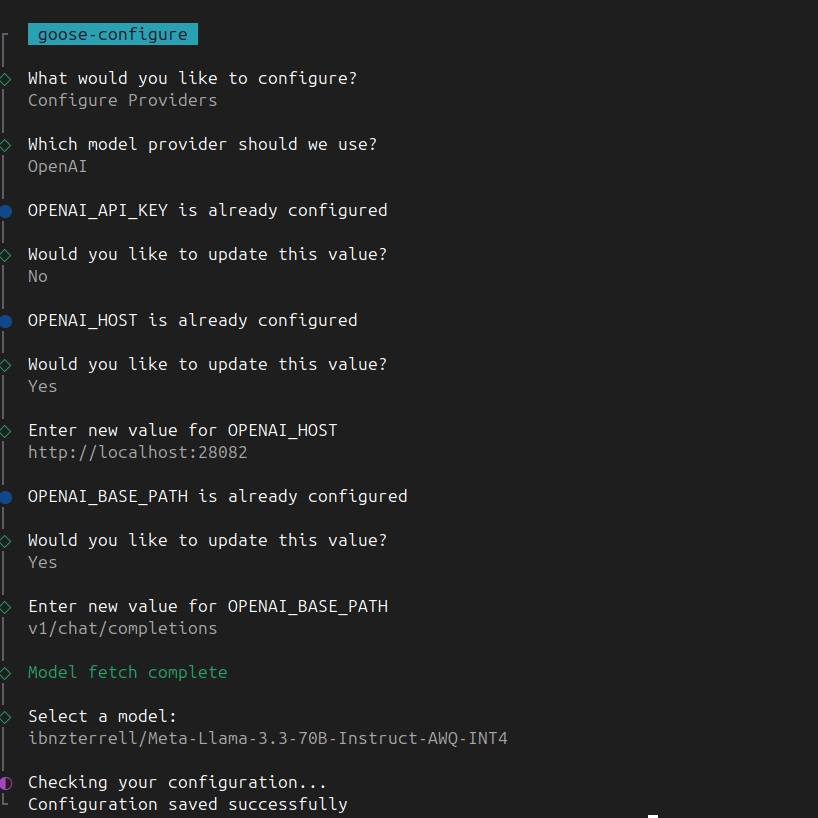
Configure goose
Run the following command to configure goose to use the privatemode-proxy backend:
goose configure
and follow the instructions in the terminal: